Bugs Everywhere is a neat piece of software implementing distributed bugtracking: it combines a bugtracker and a distributed version control system. I’ve offered to be its new maintainer, taking over from its original author of Aaron Bentley and the folks at Panoramic Feedback. Bugs Everywhere posits that the use of a centralized bugtracker for software is no less inappropriate than the use of a centralized version control system1, and that real programmers work with bugs that exist in complex states of being fixed on some branches, as yet unmerged on others, and trying to keep a mental model of which is which is doomed to failure.
For example, at OLPC we believe in cheap and fast branching, and we have feature branches (e.g. “faster”), development branches (“joyride”), release branches (“update.1”), and production branches (“candidate”, “release”). We have a bugtracker that allows us to describe bugs as being “open” or as being “resolved”, which closes them. This is not cool.
In the Bugs Everywhere world, the same branch that contains your code also contains the bug state for that code. So, as I create my “faster” branch software, I can create/close bugs linked to those commits. When my tree is merged into the next branch up, we not only get the code merged, but the bug state merged as a side-effect. The bug state is not going to become inconsistent with the code.
How does it work? We insert a .be directory into your repo, and use a command-line interface (“be”), web interface (written in TurboGears) or GUI (written in wxWidgets) to let you perform the dual operation of changing the state of the text files that describe bugs, and committing that change to the underlying VCS. We support Arch, Bazaar, GIT, Mercurial and RCS. BE itself is written in Python. Of course, another benefit of this approach is that the same offline editing advantages that your dVCS gives you apply to your bugtracker.
You might argue that being distributed sounds good, but having a common place for developers and users to go to to query bug state is important too. Having a distributed bug tracker isn’t incompatible with this — the central web interface to the bugtracker becomes just another client performing merges with the master location for the repository.
So, should you drop everything and switch to BE? Well, maybe. One way in which BE currently isn’t suited to OLPC is that we like having a central bugtracker for many projects, even though each project has its own source repository, or even several. BE would be much more suitable if we were just developing a single software project, rather than the complex selection of projects and processes that we currently track. Maybe the way forward is to run a meta-tracker that keeps track of changes in any of the specified source repositories and collates them.
Another current limitation is the web interface support, which was written against an old version of TurboGears, and is still a proof of concept. Noah Kantrowitz is interested in working on a BE backend for Trac, which would offload the web interface awesomeness to Trac.
I’m writing this post to try and build up a community around BE: please check out our wiki and mailing list, and consider hacking on it. It’s the future, honest.
1: Or at least, I do.
Dear everyone who likes Unix,
I have a binary (which uses glib and was compiled from C) and I’d like to get output with the function name each time any function in that binary is called. So, I’d like the output of ltrace(1), but for function calls rather than dynamic library calls. I am bored of adding g_debug("%s", G_STRFUNC); to the top of all my functions.
You’d think this would be easy, given that incredibly similar tools have existed for twenty years, but so far the shortest answer I’ve heard starts “well, you could write a gcc profile function stub that..”. It would be nice not have to recompile, since gdb certainly doesn’t have to, but I’d welcome the way to achieve this with a recompile as well.
Any ideas? Thanks!
Update: jmbr wins, with the only solution that doesn’t require anything more than gdb, and no recompile. Here’s his script: http://superadditive.com/software/callgraph. I’d like to work on it to add support for modules loaded with dlopen().
It’s been a year and a half since I wrote a blog post about
productivity tools — I mentioned some of the shell and editor tools I use, and it was fun and people gave me useful comments. Here’s another post, with some new lessons learned.
Emacs
python-mode flymake
Flymake is mostly the reason I’m writing this blog post. It does incremental compiling/code checking for emacs — when you make a source code change, it passes your input to an external program, and then shows (by highlighting lines in different colours) where the external program thinks that warnings or errors are.
I use it with Python, and pylint: after a code change, pylint is run on the buffer, and emacs parses the output and shows a display like the following:
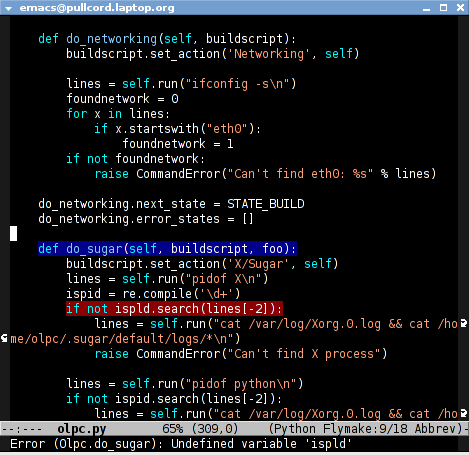
This seems like a basic thing to do, but it’s making me enjoy programming more than I ever have. My Python code almost always runs correctly first time now, as I wait for the pylint warnings to go away before trying it, and I get cheered up (and, frankly, shocked!) every time I write another fifty lines of code and it works straight away. I totally recommend it. The setup’s documented on emacswiki.
find-tag-at-point
I often work on the kernel or Xorg, and I would be totally ridiculously lost with both if I wasn’t using “tags” support in my editor. Here’s how it works: you run etags over your .[ch] files (or make tags in
a kernel source dir), and it generates a TAGS index. You load that in emacs with M-x visit-tags-table, and with the below keybinding, pressing F10 will take you to the original definition of whichever symbol the cursor is on, no matter where it appears in the source tree.
Within a few presses of F10, you’ve escaped macro hell and found where the code that actually defines the function you’re interested in is.
(defun find-tag-at-point ()
  "*Find tag whose name contains TAGNAME.
  Identical to `find-tag' but does not prompt for
  tag when called interactively;  instead, uses
  tag around or before point."
    (interactive)
      (find-tag (if current-prefix-arg
                    (find-tag-tag "Find tag: "))
                (find-tag (find-tag-default))))

(global-set-key [f10] 'find-tag-at-point)
git.el
Also, there’s fairly good GIT support in emacs, which mostly consists of turning each GIT shell script into an emacs command you can run with M-x. I use this, but it’s not particularly exciting.
M-x gdb
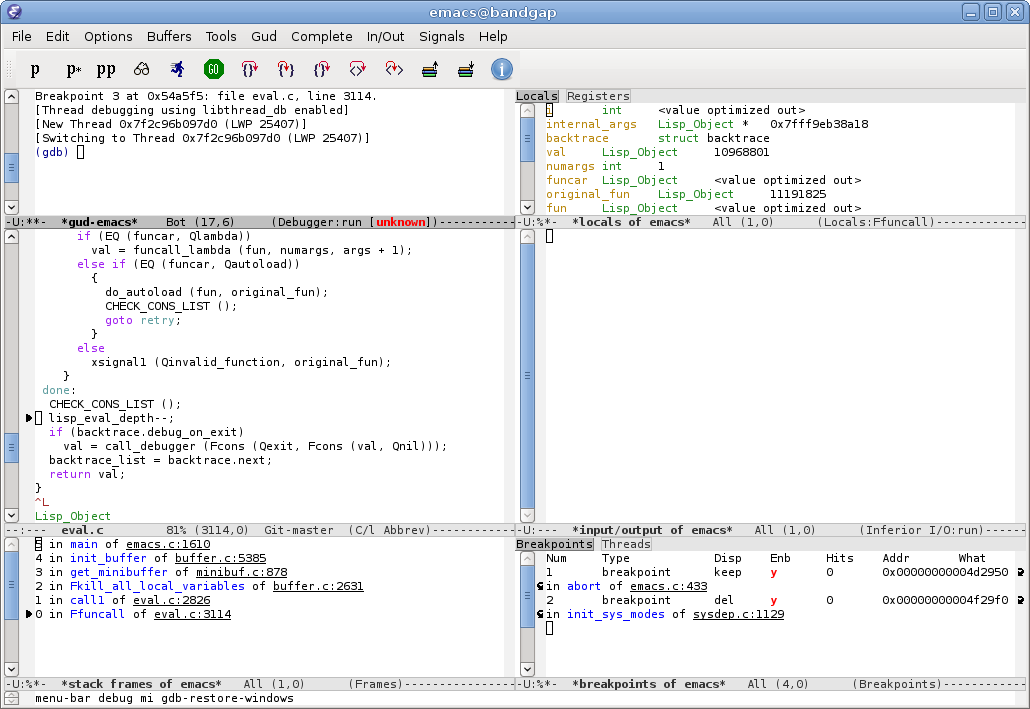
emacs22 has a new graphical GDB mode. It is awesome. Here’s a screenshot from Phil Sung.
org-mode
I’m trying to get the hang of emacs org-mode, but I’m not quite there yet. I mostly want something to manage my TODOs that don’t have hard deadlines and my diary/appointment entries that do. If anyone feels like bragging about their great org-mode setup and sharing code, go right ahead.
GIT
All of the hosted projects at OLPC use GIT, for better or worse. I thought it was for worse for a while, especially when GIT 1.4 came out and made me hate branches all over again, but there are a few new features that are making me like GIT more:
git rebase –interactive
Pierre Habouzit has already written plenty about this. Solves the “wait how do I revert this one commit I made twenty commits ago” problem, and some other ones too.
git stash
git stash lets you temporarily store changes away while you get your tree in a different state; examples are in the man page.
git add –interactive
“Anonymous” commented on this post:
Don’t forget `git add –interactive` (in newer git). It allows you to commit only certain hunks of a patch.
Misc
iprint/i
While working on a kernel driver, I was wishing for a way to take a hex number (that represented a bitfield) and print its binary decoding without having to do so in my head. The command /usr/bin/i (available as iprint in Debian/Ubuntu) does this. For example:
pullcord:cjb~ % i 0x4F
79 0x4F 0117 0b1001111 'O'
(The order there is: decimal, hex, octal, bitstring, ASCII.)
Even though this solves my problem well, I’d still like the kernel printk() to get a formatting string for “binary string” itself. I wonder if a patch would be accepted.
rpmbuild –short-circuit
I’m used to Debian’s make-kpkg, which lets you hack on a kernel source tree and then build a package out of it. rpmbuild instead wants you to supply a tarball and patches for a source tree for it to unpack, patch and build with all at once. You can get around that with the --short-circuit option, which skips steps before the one you’re after. So, rpmbuild --short-circuit -bc goes through the build and install phases, skipping the prep stage.
zsh share_history
setopt share_history lets each of my shells use the same history file, and the file is updated after every command is run, so I no longer have to flick through each shell window wondering which one in particular contains the shell with a copy of the long command I ran
in its history.
Meike asks us for our nice experiences with Free Software developers. Here’s one of mine.
I needed to find a new RSS reader. I have a somewhat lengthy subway commute to work each day, and I like listening to podcasts or reading PDFs on the OLPC laptop. I also have a pretty busy RSS feed list, and thought it’d be nice to merge my daily RSS read with my daily commute. The RSS reader I was using (Sage, a Firefox plugin) doesn’t allow that, though, since there’s no way to have it download all new feeds and present them on a single static HTML page for offline reading.
Google Reader was an obvious choice, but I try to use web services that run on Free Software when I can. Google brought me to GobbleRSS, which is a Google Reader clone with sync capabilities.
I tried installing it on my Xen host, which runs Debian/sarge. It didn’t work; I got a PHP syntax error. I sent mail to the maintainer, Guillaume Boudreau, and went to bed. I had a reply waiting when I woke up, telling me that he’d just committed what he thought was a fix to my problem. Over the next seven hours, we sent twelve e-mails between us, with him (and occasionally me) proposing fixes. It turned out that he was using PHP 5 and MySQL 4.1, and I was using PHP 4 and MySQL 4.0. By the end of the day, he had full support for the older versions of each committed.
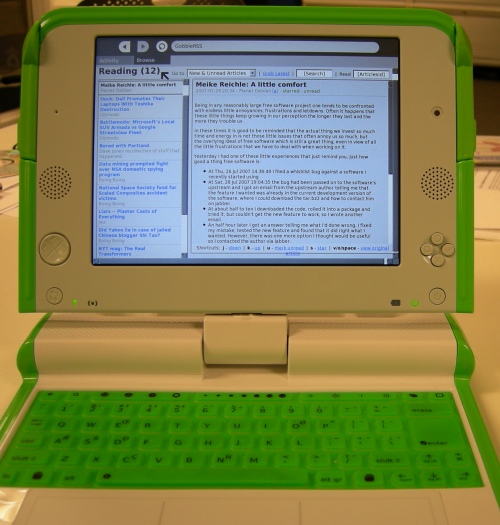
Thanks, Guillaume! Here’s a photo of what my daily commute looks like now:
The main purpose of this post is to show off a link I found documenting some of the under-used features of emacs — Effective Emacs. (Thanks to Edward O’Connor’s blog for the link.)
I’ve been on an optimisation binge recently, making sure that I’m getting the best out of my editor and shell. I decided to document some of the features I’m using:
zsh:
- Hostname completion based on the contents of your
~/.ssh/known_hosts file. This requires you to turn off HashKnownHosts (see below), and add the following to your ~/.zshrc:
       hosts=(${${${${(f)"$(<$HOME/.ssh/known_hosts)"}:#[0-9]*}%%*}%%,*})
       zstyle ':completion:*:hosts' hosts $hosts
-
Remote filename completion over ssh, which works wonderfully with public key auth, remote host completion, and the ssh ControlMaster tip below. This is enabled by default; an example use is below, with the bold characters written by tab presses rather than by my keyboard directly:
% scp foo.html printf.net:public_html/index.html
-
Colour matches in grep results (in green):
export GREP_COLOR='01;32'
alias grep='grep --color'
-
pushd: Few people seem to use directory stacks in their shell. After enabling auto_pushd as below, you can quickly popd back to the last directory you were in (and popd again for the directory before that, etc), or use dirs to see the stack of past directories that you can cd to using cd ~n, where n is the number given for that directory. To enable:
setopt auto_pushd
-
The <() construct lets you avoid having to use temporary files as arguments to commands, like so:
diff -y <(wc -l 1/*) <(wc -l 2/*)
-
zsh's cd has a useful three-argument syntax where the third argument is treated as a replacement for the portion of the current directory given in the second argument:
~/dir % ls
foo1  foo2  foo3  foo4  foo5  foo6
~/dir % cd foo5
~/dir/foo5 % cd 5 6
~/dir/foo6 %
ssh:
-
By default, modern ssh hashes the known_hosts file so that someone who hacks access to your account doesn't have a list of where they might be able to go next. This is sensible, but breaks the hostname completion above, so I turn it off in ~/.ssh/config:
HashKnownHosts no
-
New (4.0+) versions of OpenSSH have support for multiplexing several shells over a single ssh connection; this means that the second time you type ssh host, the first (already established) connection is used and told to spawn a new shell, making your new shell appear immediately instead of in a few seconds. This cuts login time for a new shell from 1.891s to 0.267s on my work machine. It also speeds up anything that uses a single ssh session per file such as bash/zsh remote filename completion (see above), or rsync/darcs/svn/etc over ssh. To enable, in ~/.ssh/config:
ControlMaster auto
ControlPath /tmp/%r@%h:%p
I have a few annoyances with ControlMaster — let me know if you know of a clean way to have the first connection for each host be created as a background process without a tty so that it can't easily be killed by accident.
emacs:
-
I use tramp to edit files remotely — this has the same host and filename completion as zsh, and is insanely useful for me; some of the machines I use at work are an ssh tunnel away (meaning high latency) and don't have emacs or vim installed (only vi, meaning no syntax highlighting). Setting up tramp is easy:
(require 'tramp)
C-x C-f /somehost:some/dir/and/file RET
-
I use gnus (see also my.gnus.org) for mail, news and RSS reading, and think it's the best mailer ever.
-
I use ERC as an IRC client.
My dotfiles are available online.