
An e-mail counting t-shirt —
I’ve been wanting to get into electronics for a while now (it seems like a sensible thing for someone who works for a laptop manufacturer to do) but haven’t known where to start. Back in January, the fine people at Sparkfun Electronics helped out with that by running a Free Day where they gave away electronics worth USD $100k: $100 free, to 1000 people. I was lucky to be one of the 1000 people, which put some electronics ideas within my reach that I otherwise would have found it hard to justify spending money on.
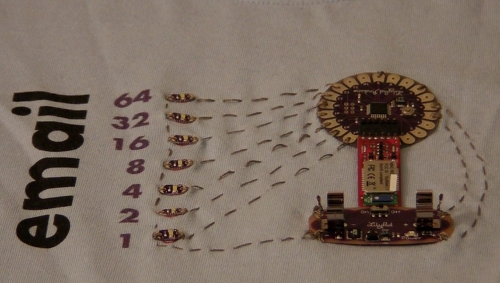
And, here’s the result — Madeleine and I made a t-shirt together that displays how much unread e-mail I have using an Arduino Lilypad and Bluetooth dongle, and an Android phone to send the number of unread mails to the shirt. Here’s an image of the center of the shirt, and a video showing it in action:
Lilypad t-shirt (youtube, download in Ogg Theora)
I’ve uploaded the source code that runs on the Lilypad and the python script that I’m running on the Android phone to my github account.
LOL. Chris, this is priceless.
haha, that is too funny!
This is hilarious! Great stuff. 🙂
excellent work.
How do you wash it?
It’s safe to hand-wash the whole shirt with a mild detergent, after removing the battery.
LOL, That’s so funny, yeah!!!
Cute – you might want to try a smaller battery though 🙂
I wanted to get into electronics too, but have kinda gone in the messy DIY direction – http://blog.hodgepig.org/
Hey Chris,
What an innovation…Incredible…I will so love to have it. Can it work with iPhone? Can you please contact me? I loved this T-shirt…
leaving my email for you to contact me….please, please mail me…
In case you didn’t know yet – you made Engadget:
http://www.engadget.com/2010/03/30/t-shirt-modded-to-let-you-know-when-you-have-new-emails/
All the incredibly cool and popular people who spend their time posting in Engadget comment threads are mocking you. 🙂
Can you buy this? I really want one!
leaving my email…
Can i buy one? please!
Hey Chris,
Great lilypad project! And a great use of your freeday swag!
I question the decision to have the Lilypad & Power so conspicuously located, but conceptually, this thing is so wonderfully geeky, that maybe it’s appropriate.
Good Stuff.
Radiation!
ya abi bırak bu antil kuntil işleri.
Excellent!
Email me…have questions. Thanks.
This is a great shirt! I’m looking to do some stuff with AndroidScript and Lilypad. Did you have a dev phone already or did you root your phone?
Great invention! Congratulations! Nevertheless I think I could help you out making it look cooler with design. In order to attract more people than just geeks. For further reference please see my portfolio at wwww.coroflot.com/jessicagzz and http://www.behance.net/jessicagzz. Feel free to contact me at jessicagzz@gmail.com
I was wondering how you made this work, because the serial library seems to missing in the Python implementation for Android.
Or did you only test it on a pc?
Cheers,
Asteronimo
Improved bluetooth code:
----------------------------- #!/usr/bin/python import sys import android import time import feedparser droid = android.Android() droid.toggleBluetoothState(True) droid.dialogCreateAlert('Be a server?') droid.dialogSetPositiveButtonText('Yes') droid.dialogSetNegativeButtonText('No') droid.dialogShow() result = droid.dialogGetResponse() is_server = result.result['which'] == 'positive' if is_server: droid.bluetoothMakeDiscoverable() droid.bluetoothAccept() else: droid.bluetoothConnect() # Settings -- change these to match your account details USERNAME="foo@bar.com" PASSWORD="whatever" PROTO="https://" SERVER="mail.google.com" PATH="/gmail/feed/atom" print "Checking for new mails...n" while True: ns = int(feedparser.parse(PROTO + USERNAME + ":" + PASSWORD + "@" + SERVER + PATH)["feed"]["fullcount"]) print "nNew mails: %sn" % ns try: droid.bluetoothWrite("new mails: " + str(ns)) except: print "Could not open Bluetooth port" time.sleep(5) droid.exit()Seems like there is a problem with the python script.
File “build/bdist.macosx-10.6-universal/egg/feedparser.py”, line 200, in __getitem__
KeyError: ‘fullcount’
There is no fullcount in the stardard feedparser. Are you using another one?
Can I have a few more lights on my?
Currently I have > 50.000 unread emails
I thought that was the hole idea about virtually unlimited mailstorage at Gmail and others.
I sign up to a lot of newsletters, and if the headline doesn’t sound to interesting, – there another unread mail for me.
The best thing – I can still find stuff from the read and unread mails with the search option.
I had a problem with setting the serial port to 115200 and using a USB cable for testing. I don’t have the bluetooth module yet but there was an error on the 2nd and 3 digit coming out as garbage, first thought it was logic issue with any number over 1 digit but turned out to be the port settings.
Pingback: half-girl, half-robot
Pingback: Wear your unread email on your sleeve .. err .. chest [VIDEO]
Pingback: T-Shirt zählt Emails via Arduino | WE wear SMART wear
This is very cool! Great idea. I have questions regarding the e-textile its self. I am doing EKG device and I am working now in the E – textile to attach my circuits there. It would be great if you can share the idea with me or articles useful to read! thanks
Pingback: Design Trends 3-10 Creative Product / Concept Designs – DesignSwan.com
Pingback: It’s t-shirt time! | Bits & Pieces from the Embedded Design World